
LINK: DENON DJ | PRICE: $1899/€1799/£1449 | MANUAL: PDF
Introduction
Denon DJ is no stranger to making bloody amazing mixers. Sadly, despite being arguably better, they have always been the bridesmaid to the Pioneer DJM’s bride. Booth dominance is something that is hard to achieve and even harder to beat, so you either settle for second place, or you go balls out. In this scenario, SC5000 Prime is the balls out piece, with the X1800 coming along to offer support.
THE USUAL DISCLAIMER
At DJWORX, we review gear and write a lot of opinion. We don’t do walkthroughs, or write detailed explanations about how things work. That’s the job of the manufacturers, to deliver manuals and tutorials. So be sure to visit the Denon DJ site for learn all about the X1800 Prime, watch the video, and read the manual too. Once you’ve done that, you can read our opinions about how we feel about what it does.
FIRST IMPRESSIONS
Given the booth takeover attempt being made by Denon DJ, you would reasonably expect that the X1800 Prime would be quite a beast. And it is — it easily passed my violent shake test, and for me is likely to withstand quite a serious beating in any booth. I certainly wouldn’t want to drop one on my foot either as it’s quite a hefty beast too.
The build quality is excellent. It’s certainly complex — wielding the worxdriver as I do, pulling out the crossfader showed a complex construction with a plastic sub frame. All the pots are nutted on which tells you a great deal about the construction. This isn’t a conventional metal faceplate affair by any means, and is reminiscent of the Traktor Kontrol Z2 in a number of ways. You can take it off by undoing a number of hex screws, and fader caps, but it’ll give you access to pretty much nothing bar a multi-pin maintenance port.
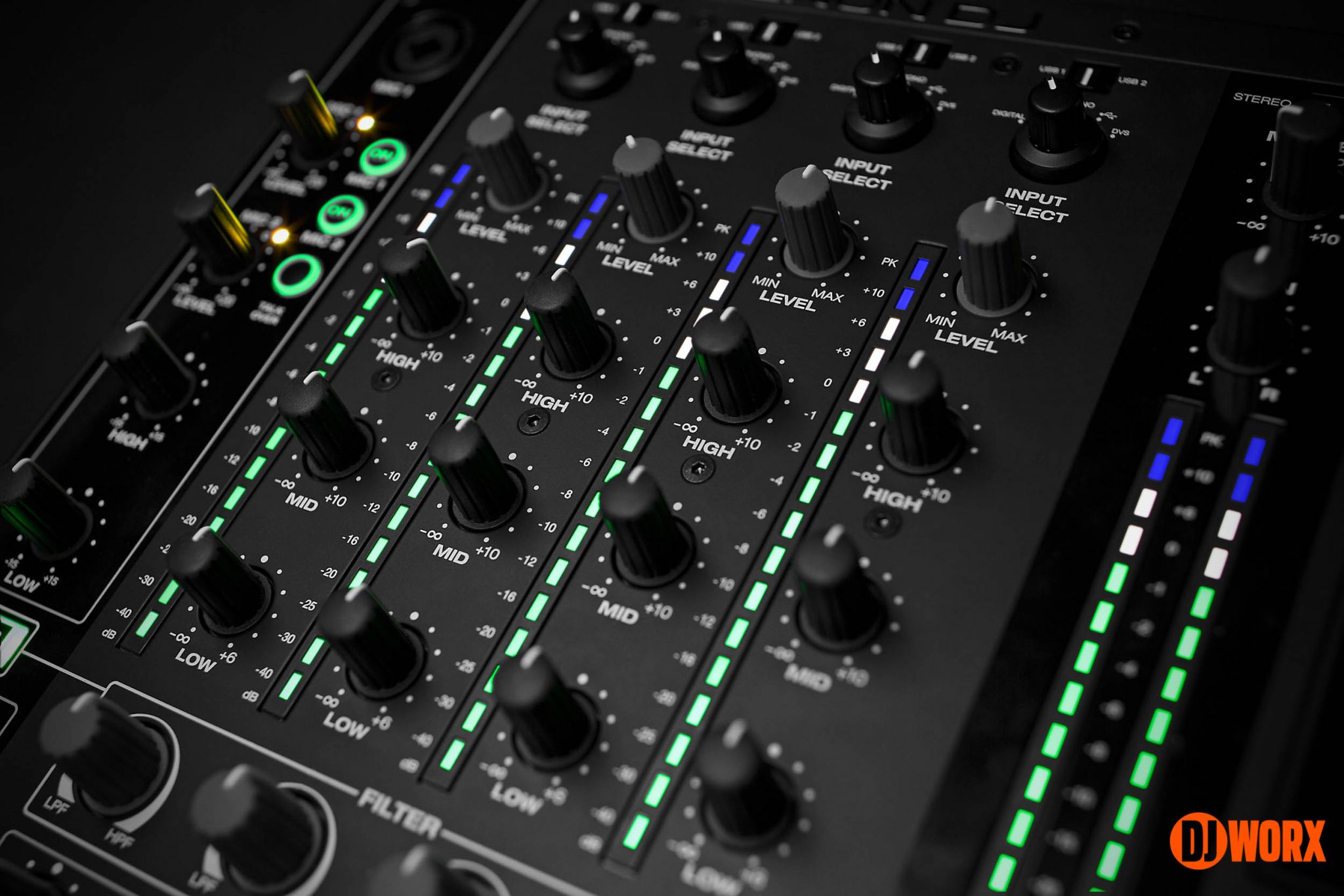
The colour scheme is going to be challenging to some, but I’m a fan. Green is clearly Denon DJ’s chosen prime colour, and for all kinds of colour psychology reasons it’s a wise choice. This also extends to the meters which eschew convention and deliver green, white, and blue LEDs. Well I guess that’s one way to stay out of the red. I wonder if these LEDs are RGB?
The knobs are a mixture of rubberised and hard plastic (with solid centre clicks where necessary), and feel solid in my hands. And answering this before it’s asked — Chroma Caps and Coolorcaps fit, but sit a little above the faceplate. And they’re a ridiculously tight fit too. Getting them off on a busy faceplate is a pain. I ended up putting a scratch on my unit. Luckily, I prefer a more sedate aesthetic.
A note about the faceplate finish — it’s a mixture of matt and gloss. But the matt finish is already going shiny around the fader area, meaning that the very expensive X1800 Prime is soon going to look less than expensive in a short time. I know matt and rubberised finishes are sexy AF, but they’re not usage friendly, and this unit is already demonstrating.
Layout wise, the X1800 Prime comfortably sticks to established standards. I’m comforted by the use of strips to differentiate sections, and the adherence to grids within those strips. One thing I do like here compared to the SC5000 Prime is that all buttons have some sort of light behind them. On a dark and complex controls surface with small buttons, being able to see things is essential.
One question — why does it sit the same height as the SC5000s, but a few millimetres higher than the VL12? Wouldn’t it have been more consistent to have them all the same height?
Wrapping up, the X1800 Prime is a formidable beast. It’s a complex but reassuringly heavy build that looks the part (for now anyway) and should take a serious beating.
FADERS
As a good section of our audience is of a more scratchy disposition, I always like to take the time to detail this area. It’s also a good excuse to bust out the worxdriver too. #RealReviewersUseScrewdrivers.
First to the crossfader — Denon DJ has its own Flex Fader design. If memory serves, it’s made in the same TKD factory as the Pro X Fade and feels suitably smooth, and is also tension adjustable. It’s a standard four pin connector that uses just three wires, and with cavernous space available, I suspect that just about any 3rd party fader will fit and work, but I’ll leave it to those guys to work out for themselves.

There’s a full mechanical (bear with me) curve control on the faceplate that delivers the usual middle dip/linear/sharp crossfader curve, as well as digital options to adjust the cut in distance or each side from within the mixer’s built-in options from -2mm to +2mm, down to a minimum of 1mm, which should satisfy all but the pickiest of scratchers. Crossfader reverses are handled with the crossfader assign switches, allowing you to decide which side cuts at the end of the crossfader. I pulled off all the usual clicks techniques without issue, although the headphone jack sitting proudly above the faceplate does get in the way a little. I think a right angle adaptor will help massively in this respect.
The channel faders are also 45mm and most probably off the shelf short bodied Alphas or similar. These too have crazy curve options allowing for sharp, linear, to fully closed for the full travel and just open at the end. Extreme curves indeed. If only it had reverses too.
I’m sure many would have liked longer and stiffer 60mm faders given the more club orientated style of the X1800 Prime, but at the same time it’s trying to be a jack of all trades.

I had hoped to get access to the line faders, but this is a review and not a service manual, so I stopped unscrewing at this point. But it’s unclear how you’ll fair with access to the line faders should anything go wrong. And given the construction of the mixer, I’d say a rotary kit is never coming.
Overall, for what is perceived as a club mixer, the X1800 Prime scores well in the fader department.
SOUND
Getting to the audio segment of this section — the X1800 Prime features a 10 in/8 out 96khz 24 bit audio interface. It’s class compliant on Mac, but does require a driver for Windows. This is pretty standard and hardly a surprise.
The X1800 Prime offers the usual three band EQ with gain. But inside the utility menus are further options for defining the type (EQ or isolator (kill)), plus high and low crossover points. This does give you a lot of scope to tweak the sound to suit your style. You can be as subtle or as extreme as you like.
Filters are well catered for on the X1800 Prime too, as they should be. Each channel gets a high/low pass, with an overall resonance control in the settings. It can be adjusted from flat to super-squelchy, with additional controls for how the filter acts at the extremes. There’s also an off button the filters too.
I feel like I should cut and paste this statement every time I review something where sound quality is a consideration — sound is entirely subjective and depends on all manner of variables. I’ve heard people rave about a mixer’s sound quality, but have someone else mercilessly destroy it in the next breath. But to me, the X1800 Prime sounds amazing. And I’m impressed with the level of control you have over sculpting the sound. Some of it is buried in the settings rather than having immediate controls, but speaking personally I’d probably play with the assorted settings until I got a sound I was happy with and leave it at that. Good work here Denon DJ.
ALL THE EFFECTS
Competing with the DJMs, you’d expect the X1800 Prime to offer a similar experience. And it does. Firstly there are the Sweep FX, essentially the equivalent of Pioneer DJ’s colour effects. These give you one out of four effects along with a combined wet/dry and parameter control. These effects are quick and dirty (Gate being the weakest), and largely help with transitions more than changing the sound. But they’re still incredibly useful.

The more meaty effects appear down the right hand side of the X1800 Prime. Just to underline this again, please read the manual for a full breakdown. But the nutshell version — the X1800 Prime offers a broad section of post fader hardware effects. You can apply one at a time to the channels, either side of the crossfader, mic, and master. You can also cue the effects too.
Obviously you get a wet/dry control. But one thing I do like the ability to apply the effect to a particular frequency only. I’m not a heavy effects user at all, but being able to do more than just change the wet/dry made me think a little more about effects usage.

The touch strip is nice too. Instead of having to use the time encoder, you can slide your finger up and down to achieve the same thing in measured steps, or jump instantly between measures, this being the main advantage of not using an encoder.
Interesting side note — the first thing I said when playing with the echo effect was that it needed a 3/4 measure. Apparently some up and coming DJ called Laidback Luke commented the same thing too. But I like to think that it was added because I asked for it rather than some barely heard of DJ. He’s not even in the DJ Mag top 100. ;)

One last thing — via the effects panel, you can route audio via the send/receive loop. And it works just like the others, including the wet/dry and effects frequency too. And being hardware effects, it’s post fader. So the echo from our in-house EFX-500 was there after I closed the line and crossfader.
Overall, the effects implementation and quality is excellent. Reiterating that I’m not a huge effects user, but other than the 3/4 and looping echo, I found myself not wanting more. It’s also heartening to see effects get updated with firmware. I also like the ability to customise the order of the effects list.
Perhaps one day my dream of being able to define your own effects via user friendly DSP software ready to upload will become a reality. I won’t hold my breath though.
THOSE USB PORTS
As technology marches on, those ultra cool features that appeared for the first time are slowly but surely becoming standard features. And dual USB ports on a club mixer are pretty much the norm now.
These dual USB ports are mainly used by DJs to swap over their laptops between sets. And at the time of writing, the only software supported is Serato DJ v1.9.10. Switching the channel selector to DVS means that you can use the phono inputs to route audio out to your laptop and back into the mixer without fuss.
A quick test shows that this is a very capable Serato DJ mixer. It’s very much plug and play, and delivers great sound with zero discernible latency. The Serato DJ effects are pre-fader though, but there’s plenty of hardware effects for those (like me) that like a tail on their echoes and reverbs. I guess we’ll just stand wait for Traktor to work with it, and for Virtual DJ to make it plug and play all on their own.
Now to MIDI — as a test, I plugged the X1800 Prime into my MBP and fired up djay Pro. Now while some of you may baulk at the thought of running anything outside of the usual suspects, djay Pro is actually excellent with mapping. It’s definitely my goto for testing such things. It auto-configured ins and outs, and within a very short time I had a rudimentary mapping that allowed me to play and mix music. Give me a day, and I’d have a full mapping for it.
What this exercise did show me was that the X1800 Prime’s control surface is 99% mappable. The only controls not available are the mic gains (they have no need to be in the digital chain), but every other touchable, turnable, or pressable control is available in your DJ software. This makes the X1800 Prime a very powerful control surface as well as a solid conventional mixer too.
INS AND OUTS
Given the inherent and designed link with the SC5000 Primes, spinning the x1800 Prime around (as opposed to awkwardly peering over the back) revealed a plethora of ins and outs.

We’ve covered the link feature elsewhere so I’ll skip past the dominating block of ports for non SC5000 Prime users.

Got to give some love to the mic channels first — Denon DJ’s main market is for mobile DJs who by depend on microphones. And the X1800 Prime offers a pair of microphone inputs — dual XLR/jack on top, and a jack at the back. The top has all the controls — gain plus on/off per mic with talkover too. There’s also tone controls for the mics. That’s not all — embedded in the utility menus are further controls over the mic’s features.
When I first looked at this section, I thought that some would be a little miffed at no obvious effects controls. Fear not, for there’s a separate mic channel on the main effects selector, meaning that you can apply any of the lengthy list of effects to the mic channel. A rather more hardcore mobile user will find something to complain about here, but as a more casual mic user, this has everything I can think of and more. Oh… phantom power would have been a nice extra, but it’s not essential.

So to the channels — at the top of each channel is a selector knob, with digital, line, phono, USB, and DVS options. Above that is a USB 1 and 2 selector, allowing for seamless changeovers, and switching of eternal gear. Explaining this first will make sense of what we see around the back.
I see RCAs per channel for line and phono, supplemented by digital ins (our choice for hooking up the SC5000 Primes with just a pair of RCA cables) as well as single digital ins and out for daisy chaining X1800s together. And despite having a solid amount of internal effects, there’s also TRS send and receive ports for hooking up external effectors. And for recording your sets, there’s a dedicated RCA record out, that thankfully isn’t as OTT hot as some.

Output wise there are (of course) balanced and unbalanced outs, as well as booth output too. And the X1800 Prime is also smart enough to give you digital control over many of the above options to, such as including microphone outputs to booth and external sources. That’s a nice touch.
In a world dominated by MIDI over USB, you can also hook up external sources and trigger them via the 5 pin DIN port too. I don’t have any so I can’t test it.
So overall, the X1800 Prime offers all the inputs and outputs that anyone could reasonably need, with full control over all of them.
DIGGING AROUND INSIDE
Like so many other units, the X1800 Prime is part hardware and part software. Yes, you can happily turn and press everything on the surface, but just below that is the layer of extra control offered in the utility menu.
I’m not about to reproduce them all in turn, but needless to say you have a high level of control beyond what you see marked on the faceplate. We’ve touched on some of them (EQ and filter for example), but inside the utility menu are advanced options for headphone cueing, microphone setup, and advanced audio.
Again, having this level of advanced software control does bode well for future improvements as well. I don’t see an X2000 Prime on the horizon any time soon, but that doesn’t mean that improvements and additional features can’t appear on the X1800 Prime either.
WITH OR WITHOUT PRIME
I did set off wondering if there was any real difference in using the X1800 Prime with or without Prime gear. And in practice, it’s largely the same. Engine Prime does however offer connectivity between Prime units for BPM syncing, track sharing, and matching channel colours to decks.
When I write it down in simplified terms, it doesn’t seem like much. But it’s pretty huge — it makes for a compelling ecosystem. And for anyone else, the X1800 Prime is no different to any other mixer of this class. It can happily sit next to turntables just like any other of its peers, and perform just as capably.
SUMMING UP
There’s a handful of smaller bits and bobs I haven’t referenced, but a quick skim of the manual will fill in feature gaps. I’m more concerned with the major features, i.e the ones that really do make or break a purchase.
The only bad thing that sticks out in our experience was a spectacular hard crash of the mixer. Just once, and attributed by Denon DJ on a stray USB cable plugged into nothing. But memorable for the fact that it brought home just how mixers have moved on from simple analogue devices to intelligent devices that need software and rebooting.
Although it sounds like a backhanded compliment, I can’t find anything really wrong, which in reviewer terms is solid praise but not especially quote worthy for the Denon DJ homepage. I’ve made suggestions to Denon DJ before this review, and inside of it too. But there’s nothing that stands out as being poorly implemented or deal-breakingly bad.
The X1800 Prime is a great mixer. Bar the touch strip, it’s not groundbreaking, but is stuffed to the gills with features that will see many making calls to their local DJ retailer. And it definitely holds its head up high when pitched against Pioneer DJ and Allen & Heath mixers. But as a hub for a SC5000 Prime setup is where it’s supposed to be, and in this respect it’s damned near essential.
GALLERY