

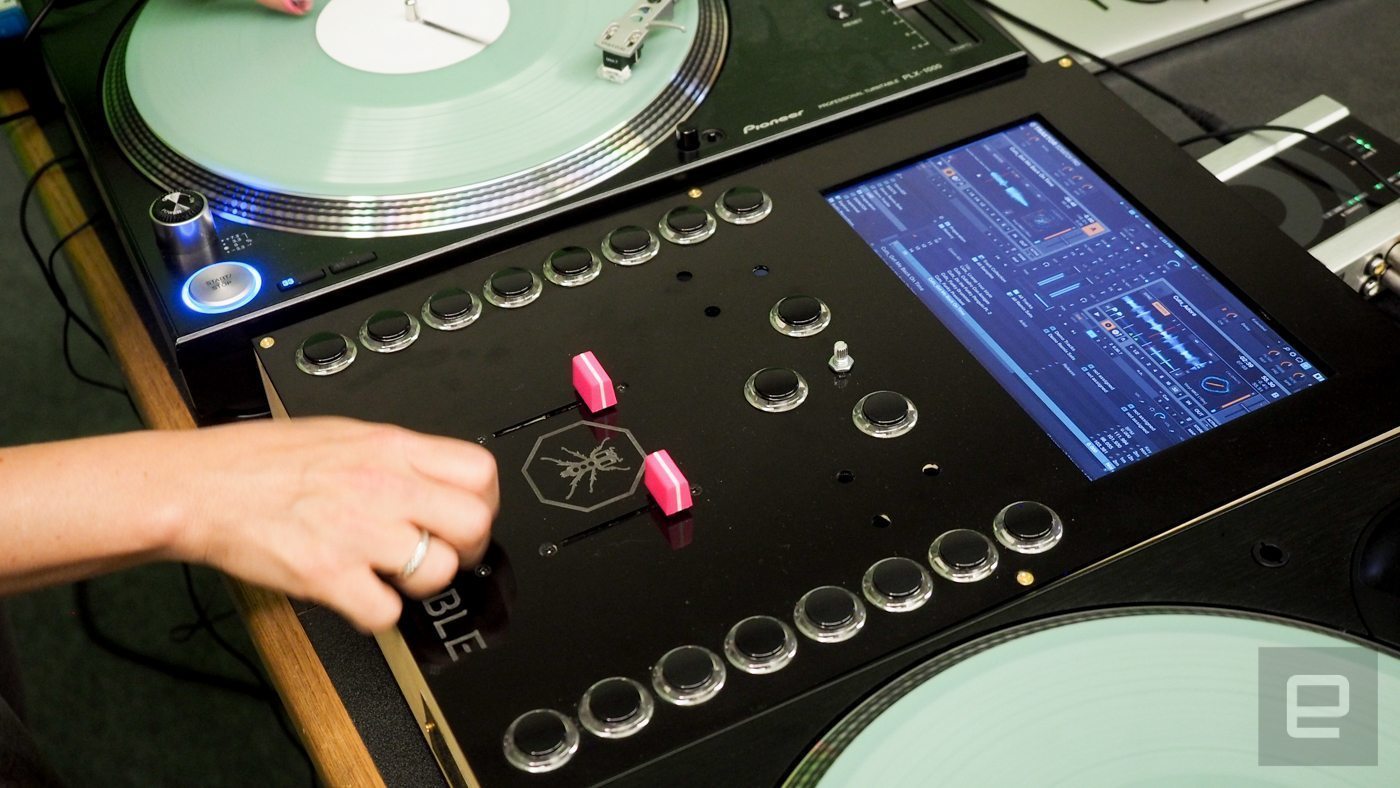
Today was the Intel Developer keynote, a place where Intel puffs out its chest and talks about cool stuff that you’ll see in the coming year or so. And one of those things comes from Thud Rumble, home of Qbert and also a technological hotbed for the last couple of years or so. Finally bearing fruit, Thud Rumble was on hand to show off the Invader mixer, the brainchild of Thud Rumbler DJ Hard Rich, and is essentially a small PC built into a mixer with a touch screen, which is a different take on the all-in-one DJing idea.
Looking at the pictures and reading the story over at Engadget, what you have is essentially a tiny Intel PC attached to a small touch screen running Windows 10 and Traktor Scratch Pro and an NI audio interface, all encased in what I assume is a MIDI control surface in a mixer sized case. This case is planned to smaller so that they can be slipped into a backpack, thus negating the need to carry mixer and laptop — just pack the Invader and you’re good to go.

Right now, this is strictly a proof of concept prototype with NI audio interfaces hanging out the back of the box. But apparently NI is working with Thud Rumble to develop an interface that will sit inside the case. It’s also planned that the Invader will also run as a regular mixer as well.
And while this is currently running with Traktor, the Invader is planned to be software agnostic (albeit Windows only) and should able to run any software, and will have USB and HDMI ports so that you can run your favourite software, touch interface permitting of course.
It’s planned to offer many options when ordering your Invader, so that you can personalise it to suit your needs. Be it buttons or pads, colour, or putting your logo right onto the faceplate, Thud Rumble will be able to make the Invader of your dreams.
So to price — an Invader with built in computer, touch screen, and audio interface is planned to run to $1699, a number that might make many very happy to drag along a laptop to a gig.
The Invader — my thoughts
Hats off to Hard Rich for putting this together. It’s an entirely logical idea that to this point has been well executed. There will always be usability issues though — the first one for me is the physical size of the unit, which is governed by the size of the touch screen and making it work in a harsh DJ environment. And the Invader is as deep as a turntable and as wide as a 4 channel mixer, i.e. bigger than the laptop that it aims to displace. And this will always an issue for anyone wanting to do such a project. Speaking of which (because if I don’t somebody else will)…
At the back of last year, DJ Techtools ran a story about the OBMFLM4, and home-brew but decidedly polished project that works in much the same way as the Invader, but is in a much more advanced state. It’s a crazy amount of controls crammed into a small space, but as the video shows it’s fully working with VirtualDJ, DVS, and video too.
I find myself conflicted about putting a full laptop in a product. DJ interfaces are notoriously crammed to the gills, so it’s going to take some work from the likes of NI and Serato to make small screen friendly touch layouts. All that stuff they put on one laptop screen could be split across a few screens accessible with a single swipe. And things like track searches need to be thought about too, i.e. offering an onscreen keyboard. There has to be a more compelling reason to use one of these other than you can leave your laptop at home, which we all know will still come along for the ride.
It is however early days yet, with a proposed end of the year delivery deadline that I feel is a tad optimistic. But having the Intel and Thud Rumble brands behind it gives some clout when it comes to twisting the arms of the DJ industry to make their software more usable on a touchscreen.
I have a long list of questions in with Hard Rich. And please feel free to ask your own as I’m sure the guys at Thud Rumble will be watching.
Despite my initial reservations, I wholeheartedly applaud Thud Rumble for pushing forward with their vision and daring to change the DJ scene. I’ll be following this with some interest.
Check out the original story over at Engadget.
GALLERY





Seriously… The combo mac mini, ipad with traxxus lemur layout (or splashtop2/duet display) and any mixer/controller is better in any point from price to modularity.
Also iPad with traktor dj app and s2/4 mk2 is better combo and less risky and if you want dvs go for djplayer and forget about moving 2K€ gear to do some scratching.
Finally if NI is seriously putting efforts in this and not focusing in improve traktor dj app traktor is going to fuck itself soon… Nowadays Djay Pro and right controller is more powerful than all this crap (sorry about the rant but it has no sense) doing stems and video at iPad (not pro required) and again cheaper and more portable.
Conclusion:
Fitting all these no sense inside a box trying to sell it as “standalone” or “computerless” makes me half angry half laugh. Putting thud rumble, intel (which has abandoned consumer tablet chip market focusing in enterprise and making this a dead road) or NI instruments in the sticker doesn’t make it “bulletproof” or “epicwin” and the first combo I described was out there from years ago now and few people saw the potential (or necessity).
NI should make their F1, X1mk2 and D2 controllers class compliant (like the did with audio6/10 dj) and wake up for iPad djing (new usb3 cappable of energy charge is the last game changer in the last 3 years).
Jm2(bilis)c xD
This could be interesting, for sure! I prefer the OBMFLM4 cuz every aspect has been thought by Sean (the design, the layout, the soundcard integration).
I hope that the OBMFLM4 will be released cuz it’s more complete.
I love and support this idea
Modular should be the future, not “all in one”.
This is exactly the idea I’ve been waiting for. Traktor built into the mixer. The technical details don’t bother me, it’s the direction I like. Go Thud Rumble!
where are the EQ’s and gains?
The techie in me is saddened they didn’t go with the latest Intel NUC, and instead went with the old, boring one… The Skull Canyon is a LOT sexier of a NUC. Might be problematic trying to shoehorn an audio interface into that case though, but at the same time that’s what the USB and thunderbolt ports could be used for…
Differences and links? I will appreciate any info about this…
Apologies for the delayed reply, I kept meaning to reply and then I’d get distracted by something else and then totally forget. I can’t quite tell which one they’re using, but the latest one Intel released (back in May of this year if I remember correctly) is their “Skull Canyon” NUC (Next Unit of Computing) – http://www.intel.com/content/www/us/en/nuc/change-the-game-with-nuc.html
Given that it looks like they’re using one of the taller ones of the older chassis, I’m going to assume it’s this one: http://www.intel.com/content/www/us/en/nuc/nuc-kit-nuc6i5syh.html ….. ….Errr, that one isn’t out yet, so we’ll go with the generation before it: http://www.intel.com/content/www/us/en/nuc/nuc-kit-nuc5i7ryh.html
Pricing is about $200 CAD difference between the two ($799 CAD for Skull Canyon, $599 CAD for the NUC5i7ryh), so I’d suspect around $125 USD or 100 GBP difference between them… One obviously looks like it means business (and comes with a 120 watt power brick to prove it, as well as two face plates (in case the skull isn’t your thing, there’s also a blank one in the box)) while the other looks like it’s meant to blend into things (and comes with a 65w laptop power brick).
Processor wise, they both have i7’s, however Skull Canyon has a sixth generation four core processor (with eight threads), while the NUC5i7 has a fifth generation dual core processor (with four threads). Skull Canyon also has a processor designed to use more power (45w TDP) versus the NUC5i7 (28w TDP).
With regards to memory, the Skull Canyon is capable of having 32GB of DDR4 (with some reviewers having tested as fast as DDR4-2800 SO-DIMMs (aka laptop memory) successfully), while the NUC5i7 uses the older DDR3 and will only allow a maximum of 16GB of DDR3-1600 SO-DIMMs.
Both have similar networking capability, having gigabit ethernet, but I’d give a slight edge to the Skull Canyon in the wireless department simply due to it having a newer 2×2 dual band wireless AC.
Connectivity is similar between the two, as each has four USB 3.0 ports with one of them capable of charging a mobile device, as well as an HDMI and mini-display port. Skull Canyon has HDMI 2.0 (versus 1.4a on the NUC5i7) but unless you’re trying to stream 60Hz or faster at 4k that isn’t much of a concern, especially since we don’t have all that many HDMI 2.0 capable monitors or televisions out yet.
As for storage, this is where things get slightly complicated. For those who might be in an environment where vibration could be an issue, the Skull Canyon arguably has the benefit there due to having no moving parts for storage (it only uses solid state storage), however the NUC5i7 does allow for a 2.5″ hard drive (also known as laptop sized using older definitions). I personally prefer the idea of the dual m.2 solid state hard drives in the Skull Canyon, but 1TB of storage on m.2 is noticeably more expensive than 1TB of a standard 2.5″ mechanical hard drive. Skull Canyon also has an SDXC slot that can be utilized.
Oh, and the Skull Canyon has a Thunderbolt port too…. For the devices that support running on Windows anyways.
If I had a choice, which of the two would I choose? Well, it’s hard to say, but I definitely like the fact that the Skull Canyon has better two band wireless, a newer processor with four cores, a built in VESA mount (you can put it on the back of a monitor if you so wish), the capability of having twice the RAM, and if you put it on the desk it looks rather lovely. The more I think about it, the more I’m tempted to pick one up as a dedicated djing rig (not to mention for the HTPC)
The i7 16gb with ssd (128gb should be enough but second hard drive will be useful) how much will cost? Such this is the most similar to top mac mini (I know the chip family is different)
Thanks for the great response, it will be very helpful for those who research before buy :)
Apologies for the delayed reply, I keep getting distracted by various other things and then forget to reply. I’ll use US market retailers and pricing, as their pricing on average seems to be similar after exchange to other markets, at least a reasonable amount of the time. Pricing information taken from company’s websites, as well as through the use of PCPartPicker as a comparison tool (to try and find better prices)
I will admit right off the bat that I haven’t done too much in the way of research when it comes to SO-DIMMs as well as M.2 solid state hard drives, so for the RAM I wound up choosing a set that several reviews of the Skull Canyon NUC had used, and with the solid state hard drive Intel gets fairly solid reviews. Yes, it’s larger than requested, but PCPartPicker was showing most of the budget SSD’s that were 128GB in size were $51.98-57.64 USD, and the higher end models were on par for pricing of the Intel 540 series 240GB.
Intel NUC Kit NUC6i7KYK Mini PC from Amazon.com – $583.99 USD
G.Skill F4-2133C15D-16GRS (16GB DDR4-2133 as 2x8GB sticks) – $62.99 USD on Newegg
Intel SSDSCKKW240H6X1 240GB M.2-2280 solid state hard drive – $84.99 USD at NewEgg
Operating system of some description, but I’ll choose Windows 8.1 Pro 64-Bit (OEM). Yes, it isn’t quite as popular as Windows 7, however they’ve cleared up a lot of the bugs, and with a number of things it does tend to run faster. This would run $129.99 USD from BH Photo.
By the look of things, excluding any shipping fees or taxes (as some states have such), we’re talking $861.96 USD as a total to have it up and running (less if you already have an operating system key, or plan on running Linux).
While there are obviously faster memory kits out there, G.Skill has been known for some time now for having exceptional performance, and a matching value for that performance too. Additionally, unless one is running incredibly memory intensive applications where getting the information processed as fast as possible is absolutely paramount (competitive gameplay, doing number crunching of some sort, rendering, or distributed computing applications like Folding@Home or various BOINC projects) there isn’t much of a noticeable difference between DDR4-2133 and DDR4-2800 for day to day usage.
As for the solid state drives, there are ones that perform better than the Intel 540’s such as Samsung’s 850 EVO ($99.99 USD for 240GB at NewEgg) or even Samsung’s 950 Pro ($187.95 USD for 256GB at NewEgg), I would personally prefer to have a second solid state hard drive for the same amount of money in order to fulfull a few different scenarios…. 1)Operating system on it’s own SSD, while one’s data and music is on another, 2)additional storage, and/or 3)redundancy through RAID 1 (mirroring of the drives). Additionally, while I understand that solid state hard drives do provide a noticeable speed boost to a variety of things, for a general use (or even “I’m taking this out on the road” rig) I can’t see the payoff for paying twice as much to get a 10-20% speed increase when reliability or separate installs for OS and data could be done for the same amount.
Thanks a lot!
Serato has the dashboard, Why not build a computer into it? Then all you need is dashboard and an Akai AMX/AFX combo for a super tiny setup that also looks clean (no laptop screen obstructing the crowd).
It should be the right movement but the fact Intel has moved from x86 platform (atom like the nuc used in this prototype) to Arm platform (which is the Core used at iOS devices) makes some paths a bit difficult. If you search (or remember in the case you know it) the Intel devs conference where somo Numark protottypes where shown, these were more or less standalone machines thanks a tablet integration (x86 with win8). One mpc and somkind of NS7mk3 standalone… But again my doubts are become prophecies.
Bye bye atom, hello iPad.
These prototypes or “standalone” machines are perfectly doable nowadays (and years ago) using iDevices but people see iPads as toys (wrong!) and ask for solutions which fail by themselves (winphone x86 lol).
Some research and study will help anybody interested in R&D sincerely…
interesting times ahead! I hope thudd rumble will tackle maschine next
Cool idea, but I can tell you for free – traktor on touchscreens is a bit rubbish. I bought a Surface Pro 3 about a year ago and it really doesn’t play nice with traktor. Just trying to work with the traktor UI with a touchscreen is a non-starter without some sort of overlay software…
You should try traxus lemur layout. It works on old ipads and also android.
I would like to see a real mixer with somekind of standalone dvs-system build in. Not a build in computer, that runs windows.
That way the developers has to get the most out the system like a playstation or OG MPC (not the new rubbish controller ones).
Yes… People are still having sex.
https://instagram.com/p/BJSt6tIhWoL
Built in screen and computer aside for a sec… if Thud brings free flowing line fades with full curve control, fader reverse and channel swap to a Traktor certified mixer then I’ll be most grateful!
As some one who’s already tied to taking a mixer out to dj the Invaders gonna simplify things a step further, so it’s got my interest.
Big thumbs up for a clutter free work surface but a cluster of small modifier/shift/mode buttons near the groups of performance controls would be a must to max the digital dj potential of the controls available. As an all in one unit I’d want hardware access to all key performance features, rmx decks, slice mode, freeze, pad effects etc… via an intuitive workflow. A partnership with djTechtools on the mapping side would a smart move I feel, fine tuning a small number of controls to max intelligent use of digi dj features is a craft techtools have mastered better than anyone. Ultimately it’s a digital dj unit, so getting the control surface – software integration nailed is 100% key.
Either that mixer is huge or that Dj has a small hand?
Been using mine, completely error free, for a year now (4th gen btw, been building all-in-one / pc mixer for 10 years now). Mine is 12″x12″x4″ and record bad friendly ;o) As far as touchscreen concerns go, I’m all about getting away from touching / looking at screens. All navigation is done via controls. I’m only using the screen to browse at this point and use large font setting for viewing… no problem, for me. All my best, Sean / Dj Dab
OBERmod OBMFLM4 images